
Update: Some more cropping tools. This one, which is – I think – called Favicon Generator, was suggested by @ourman and Twitshot by @xxnapoleonsolo. Thanks chaps.
When it comes to critiquing others’ work, I am very much of the ‘there but for the grace of God…’ school of thought. I’m fairly sure, for example, there are enough spelling and grammar issues over the course of this blog’s eight or so years to make the average sub editor’s heart sink.
But.. there is a new-ish thing that is quietly driving me nuts and, as more titles latch on to the idea of Tweet+image+link = More Engagement it’s spreading like a weed.
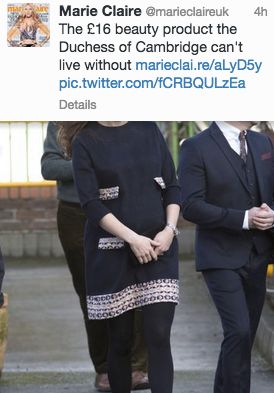
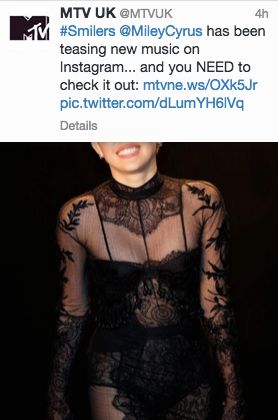
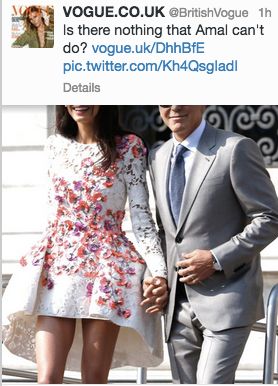
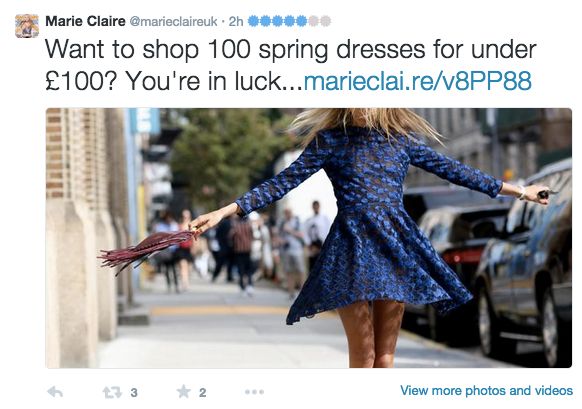
It’s the phenomenon of Headless Subject Matter. Here are some examples (and I’m sorry, titles below, to pick you out – another time search would have revealed several different offenders I’m sure)…
The Headless Royal (thankfully not in the wives of Henry VIII sense)
The Headless-But-Clothed-So-That’s-Something Pop Sensation
The Headless Only People In The World To Have Married, Ever
The Headless My-Dress-Cost-Less-Than-A-Tonne-So -I’m-Spinning-With-Joy Model
And finally, two Cropping Crimes for tragic Jagger. Poisoned (allegedly) and now beheaded – what is this? The 13th century?


The thing is, even when it looks normal in the tweet, the preview (these examples are from Twitter and Tweetdeck) often doesn’t. I learned bitter lessons last week, as I selected, cropped, uploaded, posted, checked… and then deleted photos on both Twitter and Facebook posts because I’d sized them wrongly. Eventually Google (or Audience Review, to be accurate) provided me with a key: Use a 2:1 ratio, with the best upload size being 1024×512, as this scales down well to 440×220.
And when it comes to tools, I use Canva, PicMonkey and Spruce (all are excellent for overlaying text too, although I found I had to close and reopen Spruce each time I wanted to upload a new pic).
Links with photos in Facebook also have a nasty tendency to crop in unfortunate ways. I tend to get around this by uploading a specific image rather than going with whatever the link generates. I found this post very helpful in choosing sizes.
So, a minor gripe in the scheme of things but it’s something that takes just minutes to get right, and it makes all the difference in the world.


